
Smart Switch Anywhere PRO6.5 - Get APK
You'll be able to download in few seconds.
Publisher Description
※ Android 2.2 (Froyo) and over
========================
★☆ Key Features ☆★
========================
■ Operation Mode
⊙ Overlay Icon Mode
⊙ Overlay SideBar Mode
⊙ Overlay Magic Mode (Recommend)
■ Major Features
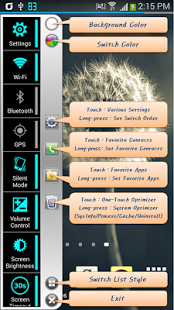
⊙ Various Settings
You can change the various settings quickly on any screen.
⊙ Favorite Contacts
You can make a call or send SMS on any screen after registering the favorite contacts.
⊙ Favorite Applications
You can run the applications on any screen after registering the favorite applications.
⊙ Useful Overlays
You can use the various overlay features conveniently on any screen.
⊙ System Optimizer (One-Touch Optimizer)
You can kill unnecessary processes and clear cache by one-touch optimizer.
⊙ Spy Mode (Also available on lock screen)
You can take picture and record audio/video/call quickly whenever and wherever.
■ Various Settings
⊙ Settings
⊙ Wi-Fi (Long-press : Wi-Fi List)
⊙ Bluetooth (Long-press : Bluetooth List)
⊙ GPS
⊙ Silent Mode (Silent/Vibrate/Sound)
⊙ Volume Control (Media/Ring/Notification/Voice Call/Alarm/System)
⊙ Screen Brightness
⊙ Screen Filter (Long-press : Detail Settings)
⊙ Screen Timeout (Long-press : ∞ = Always On)
⊙ Screen Lock/Unlock
⊙ StatusBar Clock (Useful in full screen)
⊙ Flashlight (Works only with LED torch mode)
⊙ NFC
⊙ Mobile Data
⊙ Screen Rotation
⊙ Auto Sync
⊙ Airplane Mode
⊙ Wi-Fi Hotspot
⊙ Battery Usage
⊙ App Manager
⊙ Music Visualizer
■ Favorite Contacts
⊙ Touch : Make a Call
⊙ Long-press : Send SMS
⊙ Gesture(Swipe) : Contact Details
■ Favorite Applications
⊙ Touch : Run the Applications
⊙ Long-press : Application Info
■ Useful Overlays
⊙ Overlay SMS Popup
⊙ Overlay Camera
⊙ Overlay Calendar
⊙ Overlay Calculator
⊙ Overlay Stopwatch/Timer
⊙ Overlay Music Player
⊙ Overlay Browser
■ System Optimizer (One-Touch Optimizer)
⊙ System Info
⊙ Kill Process
⊙ Clear Cache
⊙ Uninstall Apps
■ Spy Mode (Long-press : Detail Settings)
⊙ Spy Photo (Taking Picture)
⊙ Spy Audio (Voice Recording)
⊙ Spy Video (Video Recording)
⊙ Screen Recording (Android v5.0 or later)
⊙ Auto Call Recording
■ Extra Features
⊙ StatusBar Battery Icon
⊙ StatusBar Date Icon
⊙ Expand StatusBar
⊙ Screen Off
⊙ Quick Search
⊙ Screen Capture (Android v5.0 or later)
⊙ Soft Keys (Recent Apps/Home/Back)
⊙ Icon Box on Lock Screen
⊙ Charging Info
⊙ Find My Phone
⊙ Hourly Reminder
⊙ Screen Off Widget
⊙ Expand StatusBar Widget
⊙ Flashlight Widget
⊙ Battery Level Widget
=================
★☆ Caution ☆★
=================
■ Flashlight
It must be supported the 'FLASH_MODE_TORCH' of camera function.
■ Overlay Camera
Some devices that don't support the overlay preview feature may not work.
■ Marshmallow(6.0) Version
1. Call Recording
Google has blocked the call recording feature from marshmallow version. Because they do not accept the call recording regulations by the law each country. Overlay TAB in my app → Detail Settings of Overlay Spy Mode → Auto Call Recording → Audio Source : DEFAULT/MIC/..., File Format : WAV.
2. App Permissions
The app permission feature has strengthened from marshmallow version. Main Settings → Application Manager → Touch the app you want to review → Touch Permissions → If the permissions are turned off, please turn the permissions on.
About Smart Switch Anywhere PRO
The company that develops Smart Switch Anywhere PRO is James Kim. The latest version released by its developer is 6.5.
To install Smart Switch Anywhere PRO on your Android device, just click the green Continue To App button above to start the installation process. The app is listed on our website since 2016-06-14 and was downloaded 0 times. We have already checked if the download link is safe, however for your own protection we recommend that you scan the downloaded app with your antivirus. Your antivirus may detect the Smart Switch Anywhere PRO as malware as malware if the download link to com.hardrock.smartswitchanywhere is broken.
How to install Smart Switch Anywhere PRO on your Android device:
- Click on the Continue To App button on our website. This will redirect you to Google Play.
- Once the Smart Switch Anywhere PRO is shown in the Google Play listing of your Android device, you can start its download and installation. Tap on the Install button located below the search bar and to the right of the app icon.
- A pop-up window with the permissions required by Smart Switch Anywhere PRO will be shown. Click on Accept to continue the process.
- Smart Switch Anywhere PRO will be downloaded onto your device, displaying a progress. Once the download completes, the installation will start and you'll get a notification after the installation is finished.
Program Details
System requirements
Download information
Pricing
Version History
version 6.5
posted on 2016-06-14
[ v 6.5 ],▣ Support Marshmallow,▣ Added Icons of Switch List,1. Application Manager,2. Auto Call Recording,▣ Added Features,1. Hourly Reminder,2. StatusBar Date Icon,3. Quick Search (Long-press Bottom Center),▣ Added Widgets,1. Screen Off Widget,2. Expand StatusBar Widget,3. Flashlight Widget,4. Battery Level Widget,▣ Enhanced Features & Fixed Bugs
version 4.2
posted on 2013-07-02
Several fixes and updates
Disclaimer
External Download
We do not host Smart Switch Anywhere PRO on our servers. We did not scan it for viruses, adware, spyware or other type of malware. This app is hosted by Galad and passed their terms and conditions to be listed there. We recommend caution when installing it.
The APK Download link for Smart Switch Anywhere PRO is provided to you by apps112.com without any warranties, representations or guarantees of any kind, so access it at your own risk.
If you have questions regarding this particular app contact the publisher directly. For questions about the functionalities of apps112.com contact us.
